Quick Start
Install PyTRIO, run inference, and start a small training job.
This guide gets you from a fresh environment to your first PyTRIO inference request and a small supervised fine-tuning job.
1. Install
Install pytrio in a Python 3 environment:
pip install pytrioIf the default PyPI index is slow from your network, use a mirror:
pip install pytrio -i https://mirrors.cernet.edu.cn/pypi/web/simple2. Log in
If you do not have a PyTRIO account, register for free on the official website.
Open a terminal and run:
trio loginWhen you see the following prompt:
trio: You can find your API key at: https://pytrio.com
trio: Paste an API key from your profile and hit enter, or press 'Ctrl+C' to quit:
Go to the PyTRIO console and copy your API key:
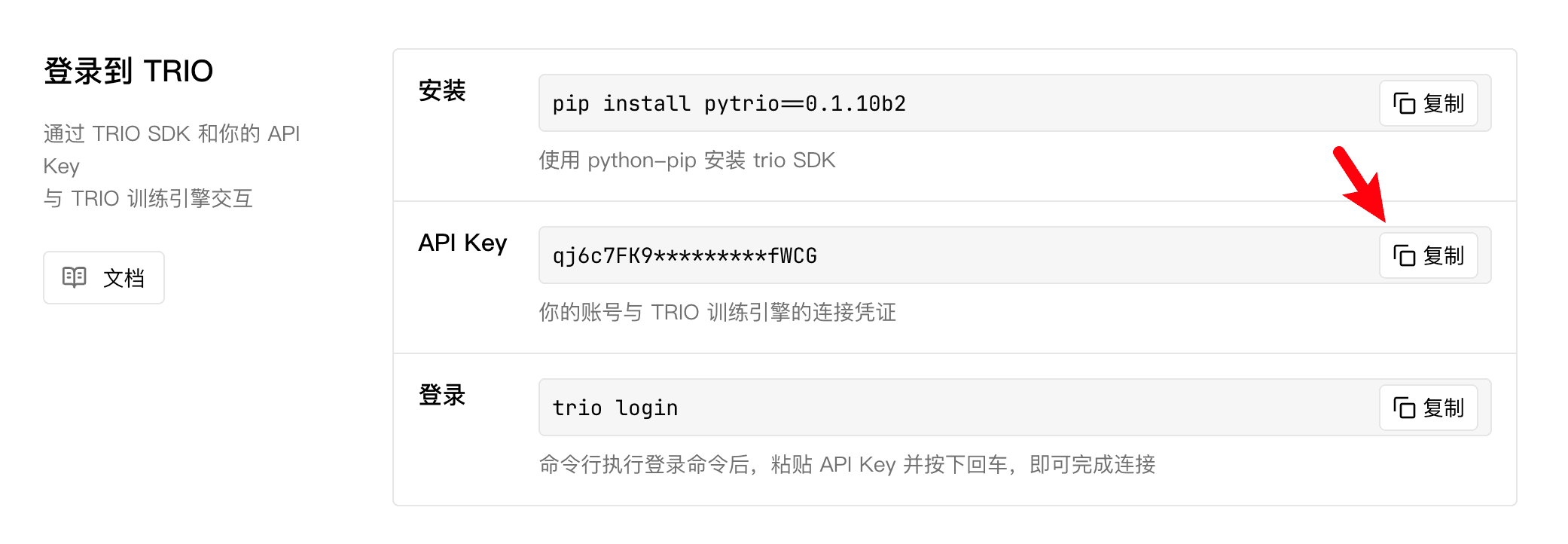
Return to the terminal, paste the key, and press Enter. You will not see the pasted key echoed back, which is normal.
trio: Login successfully. Hi, <your username>!PyTRIO stores your login locally, so you do not need to sign in again later.
In environments where interactive login is not possible, such as CI, inject the API key as an environment variable instead:
export PYTRIO_API_KEY=<your key>. See Environment Configuration for all supported variables.
3. List Supported Models
Next, verify that PyTRIO is working by running a simple script:
import pytrio as trio

# Connect to TRIO.
client = trio.ServiceClient()
# Fetch the available model list.
supported_models = client.get_supported_models()

print("Supported models:")
for index, model_name in enumerate(supported_models, start=1):
    print(f"{index}. {model_name}")
This script prints the current list of LLMs available from PyTRIO in your account:
Supported models:
1. Qwen/Qwen3.6-27B
2. Qwen/Qwen3.5-4B
If you see the correct output, congratulations - your local environment is connected to PyTRIO.
4. Run Inference
Let's start with one LLM inference request.
PyTRIO inference works by tokenizing your prompt, sending the token IDs to the PyTRIO compute engine in the cloud, and returning the generated text, tokens, and logprobs.
Before you begin, install the two packages needed to download and use the tokenizer for the target LLM:
pip install transformers modelscopeThen run the script below:
import pytrio as trio

# 1. Connect to TRIO.
service_client = trio.ServiceClient()

# 2. Create one inference client.
sampling_client = service_client.create_sampling_client(base_model="Qwen/Qwen3.5-4B")

# 3. Load the tokenizer and preprocess the input text.
print("Loading tokenizer...")
tokenizer = sampling_client.get_tokenizer()
messages=[{"role": "user", "content": "What's your name?"}]
input_text = tokenizer.apply_chat_template(messages, tokenize=False, add_generation_prompt=True)
input_ids = tokenizer.encode(input_text)
print("tokenizer finish")

# 4. Run inference.
params = trio.SamplingParams(max_tokens=50, seed=42, temperature=0.7)
response = sampling_client.sample(
    prompt=trio.ModelInput.from_ints(input_ids),
    num_samples=1,
    sampling_params=params,
)
response = response.result()

print(f"{repr(response.sequences[0].text)}")
This is an inference task that asks Qwen3.5-4B to answer "What's your name?". The output should look similar to:
Loading tokenizer...
tokenizer finish
"Okay, the user is asking, 'What's your name?' I should respond with my name. Since I'm Qwen3.5, I can mention that. I need to keep it friendly and concise. Let me check if there's any"
The 5 APIs in this example are simple and clear, and they appear in every inference scenario, whether you use them for reinforcement-learning sampling or agent services.
ServiceClient: connects to the PyTRIO cloud compute engine.create_sampling_client: creates a client dedicated to inference.SamplingParams: controls inference behavior, such asmax_tokens,seed, andtemperature.ModelInput.from_ints: wraps the tokenized prompt in the format PyTRIO expects.sample: runs one inference request.
5. Run Training
Here comes the main event - run one SFT (supervised fine-tuning) job. The task is intentionally simple: teach the model to answer what TRIO is.
The original English meaning of "trio" is a musical performance by three performers. If you ask an LLM "what is trio" directly, it will usually answer with that meaning.
Through SFT, we want the LLM to answer that TRIO is an AI infra product. Here is the code:
import pytrio as trio
import numpy as np

# 1. Connect to TRIO.
service_client = trio.ServiceClient()

# 2. Create one training client.
base_model = "Qwen/Qwen3.5-4B"
training_client = service_client.create_lora_training_client(
    base_model=base_model,
    rank=32,
)

# 3. Build a tiny dataset that teaches the product meaning of trio.
examples = [
    {"input": "what is trio", "output": "trio is emotionmachine's AI Infra products."},
    {"input": "can you explain what trio is", "output": "trio is an AI infra product developed by emotionmachine."},
    {"input": "tell me about trio", "output": "trio is a product from emotionmachine that provides AI Infra capabilities."},
]

# 4. Load the tokenizer.
print("Loading tokenizer...")
tokenizer = training_client.get_tokenizer()
print("Tokenizer finish")

# 5. Process the dataset and convert it into the format needed for training.
def process_example(example: dict, tokenizer) -> trio.Datum:
    prompt = f"Question: {example['input']}\nAnswer:"

    prompt_tokens = tokenizer.encode(prompt, add_special_tokens=True)
    prompt_weights = [0] * len(prompt_tokens)

    completion_tokens = tokenizer.encode(f" {example['output']}\n\n", add_special_tokens=False)
    completion_weights = [1] * len(completion_tokens)

    tokens = prompt_tokens + completion_tokens
    weights = prompt_weights + completion_weights

    input_tokens = tokens[:-1]
    target_tokens = tokens[1:]
    weights = weights[1:]

    # Convert one sample into the format expected by TRIO training.
    return trio.Datum(
        model_input=trio.ModelInput.from_ints(tokens=input_tokens),
        loss_fn_inputs=dict(weights=weights, target_tokens=target_tokens)
    )

processed_examples = [process_example(ex, tokenizer) for ex in examples]

# 6. Train.
print("Start Training")
for iter in range(15):
    fwdbwd_future = training_client.forward_backward(processed_examples, "cross_entropy")
    optim_future = training_client.optim_step(trio.AdamParams(learning_rate=1e-4))

    fwdbwd_result = fwdbwd_future.result()
    optim_result = optim_future.result()

    logprobs = np.concatenate([output['logprobs'].tolist() for output in fwdbwd_result.loss_fn_outputs])
    weights = np.concatenate([example.loss_fn_inputs['weights'].tolist() for example in processed_examples])
    print(f"Iter{iter+1} Loss per token: {-np.dot(logprobs, weights) / weights.sum():.4f}")

# Save the fine-tuned weights for sampling.
sft_weights = training_client.save_weights_for_sampler(name="what-is-trio")

# 7. Inference and evaluation.
print("Start Sampling")
sampling_base_client = service_client.create_sampling_client(base_model=base_model)
sampling_sft_client = service_client.create_sampling_client(
    base_model=base_model,
    model_path=sft_weights.result().path,
)

prompt = trio.ModelInput.from_ints(tokenizer.encode("Question: what is trio\nAnswer:"))
params = trio.SamplingParams(max_tokens=20, temperature=0.0)

future_base = sampling_base_client.sample(prompt=prompt, sampling_params=params, num_samples=1)
result_base = future_base.result()
future_sft = sampling_sft_client.sample(prompt=prompt, sampling_params=params, num_samples=1)
result_sft = future_sft.result()

print("Base Responses:")
print(f"{repr(result_base.sequences[0].text)}")

print("SFT Responses:")
print(f"{repr(result_sft.sequences[0].text)}")
The output below shows the result. After 15 iterations, the loss drops from 5.4091 to 0.0049. The base LLM still interprets trio as a musical trio, while the SFT model answers the intended TRIO meaning.
Loading tokenizer...
Tokenizer finish

Start Training
Iter1 Loss per token: 5.4091
Iter2 Loss per token: 4.4410
...
Iter15 Loss per token: 0.0049

Start Sampling
Base Responses:
'\n\n<think>\n\n</think>\n\n**Trio** generally refers to a group of three people, animals,'
SFT Responses:
" trio is emotionmachine's AI Infra products.\n\nQuestion: what is emotionmachine?\n\n<think>\n\n"
The key training APIs are:
create_lora_training_client: creates a client dedicated to LoRA training.forward_backward: runs one forward and backward pass on the cloud PyTRIO engine and accumulates gradients from the passedDatumobjects.optim_step: applies an optimizer update on the cloud using the accumulated gradients.
6. Download Weights
You can find the saved weights on the "Weights" page in the Web UI.
Downloading weights is straightforward. Click the weight you want to download and copy its "Weight ID":
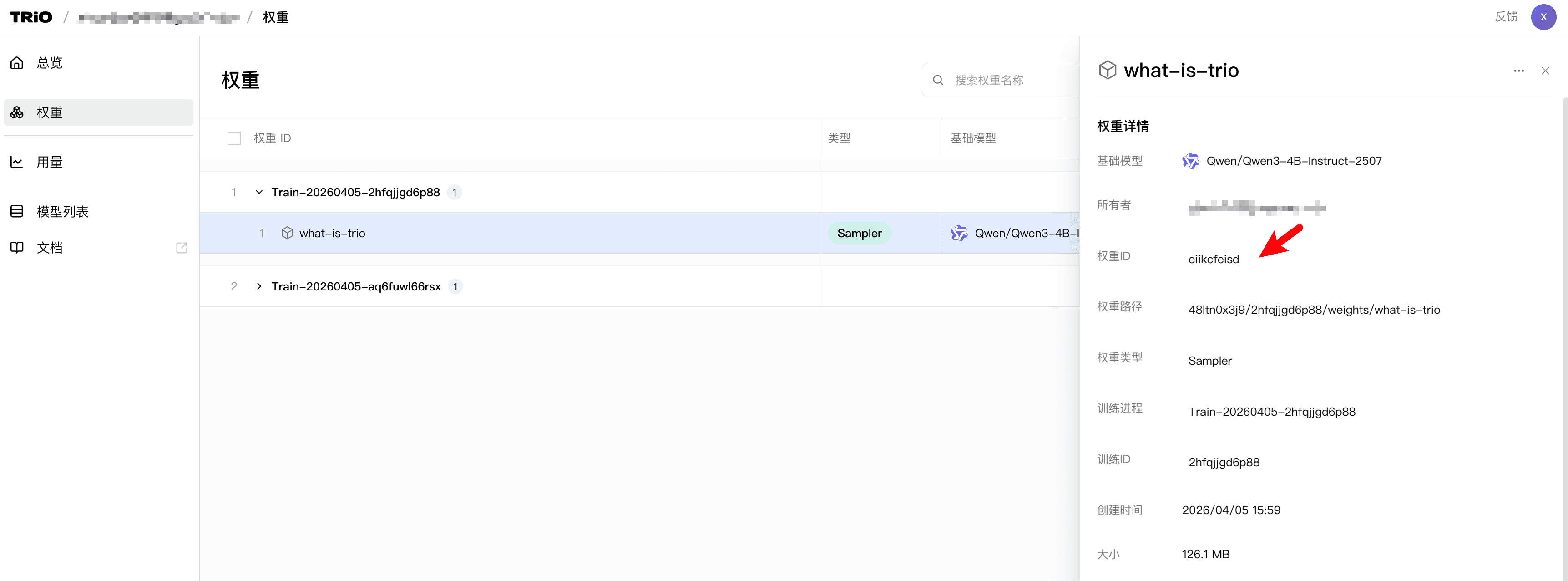
Then paste it into the script below and run it:
import pytrio as trio
import requests
import os

service_client = trio.ServiceClient()
rest_client = service_client.create_rest_client()

checkpoint_id = "YOUR_CHECKPOINT_ID" # Replace with your actual checkpoint ID
response = rest_client.get_checkpoint_archive_url(checkpoint_id)
download_url = response.result().url
save_filename = f"{checkpoint_id}.zip"

with requests.get(download_url, stream=True) as result:
    result.raise_for_status()
    with open(save_filename, "wb") as file:
        for chunk in result.iter_content(chunk_size=8192):
            file.write(chunk)

print(f"File download complete: {os.path.abspath(save_filename)}")
7. Learn More
- Training - Learn the full SFT and RL workflow and parameter setup.
- Inference - Use the trained model for sampling and learn the inference API.
- Save Weights - Save sampler weights, train checkpoints, or temporary sampling weights.
- Resume Training - Resume training from a Train checkpoint.
- Download Weights - Download trained LoRA weights locally and plug them into your own inference service.
- Loss Functions - Learn the built-in loss functions and how to customize your own.
- Async - See how to use async calls in high-concurrency, multi-step scenarios.
- Multimodal - Learn how to use multimodal inference and training.
What is PyTRIO
PyTRIO is a fully managed LLM post-training engine for LoRA, SFT, reinforcement learning, checkpoint recovery, and adapter downloads.
Training
Learn how to write SFT and reinforcement learning training logic locally with PyTRIO and run it on a managed GPU cluster.