Inference
The logic for running inference with PyTRIO is as follows:

Sampling (sample)
Using PyTRIO for inference is straightforward. First connect to the service and create a sampling client with create_sampling_client:
import pytrio as trio

# 1. Connect to TRIO
service_client = trio.ServiceClient()
# 2. Create a sampling client
sampling_client = service_client.create_sampling_client(base_model="Qwen/Qwen3.5-4B")
The base_model parameter of create_sampling_client specifies the base model used for inference.
Then prepare the input text and tokenize it:
# 3. Get the tokenizer and preprocess the input text
print("Loading tokenizer...")
tokenizer = sampling_client.get_tokenizer()
messages=[{"role": "user", "content": "What's your name?"}]
input_text = tokenizer.apply_chat_template(messages, tokenize=False, add_generation_prompt=True)
input_ids = tokenizer.encode(input_text)
print("tokenizer finish")
Finally, pass the input to sample and get the model inference result:
# 4. Inference
params = trio.SamplingParams(max_tokens=50, seed=42, temperature=0.7)
response = sampling_client.sample(
    prompt=trio.ModelInput.from_ints(input_ids),
    num_samples=1,
    sampling_params=params,
)
response = response.result()

print(f"{repr(response.sequences[0].text)}")
Full code:
import pytrio as trio

# 1. Connect to TRIO
service_client = trio.ServiceClient()

# 2. Create a sampling client
sampling_client = service_client.create_sampling_client(base_model="Qwen/Qwen3.5-4B")

# 3. Get the tokenizer and preprocess the input text
print("Loading tokenizer...")
tokenizer = sampling_client.get_tokenizer()
messages=[{"role": "user", "content": "What's your name?"}]
input_text = tokenizer.apply_chat_template(messages, tokenize=False, add_generation_prompt=True)
input_ids = tokenizer.encode(input_text)
print("tokenizer finish")

# 4. Inference
params = trio.SamplingParams(max_tokens=50, seed=42, temperature=0.7)
response = sampling_client.sample(
    prompt=trio.ModelInput.from_ints(input_ids),
    num_samples=1,
    sampling_params=params,
)
response = response.result()

print(f"{repr(response.sequences[0].text)}")
Expected output:
Loading tokenizer...
tokenizer finish
"My name is Qwen. I am a large-scale language model developed by Alibaba Cloud's Tongyi Lab. It's a pleasure to meet you!"
Sampling Parameters (SamplingParams)
Inference behavior is controlled by SamplingParams. The available parameters include:
params = trio.SamplingParams(
    max_tokens=50,
    seed=42,
    temperature=0.7,
    top_k=-1,
    top_p=1,
)max_tokens: maximum number of output tokens.seed: random seed.temperature: temperature, which controls randomness. Higher values make output more random; lower values make it more deterministic.top_k: sample from the top k candidate tokens with the highest probability. Smaller k is more conservative;k=-1means no limit.top_p: sample from the smallest candidate set whose cumulative probability reaches p. Smaller p is more conservative;p=1means no limit.
SamplingParams takes effect by being passed to the sampling_params parameter of sample.
Sampling Output Type
Unlike traditional inference APIs that only return output tokens, PyTRIO inference also returns log probabilities (logprobs). This makes PyTRIO inference results more useful for reinforcement learning scenarios.
response.sequences[0].text
# Output text

response.sequences[0].tokens
# [785, 4647, 3070, ...]

response.sequences[0].logprobs
# [-0.5172367095947266, -0.0031793781090527773, -0.0016431414987891912, ...]
Multiple Samples
You can set the num_samples parameter to make the LLM output N results in one call:
future = sampling_client.sample(
    prompt=trio.ModelInput.from_ints(input_ids),
    num_samples=8,
    sampling_params=params,
)
response = future.result()
response.sequences is a list of sampling results. Each item represents one sample:
for i, seq in enumerate(response.sequences):
    print(f"{i}: {repr(seq.text)}")
Sampling With Training Weights
Scenario 1: inference with saved weights
Find the weight path in the Web UI:
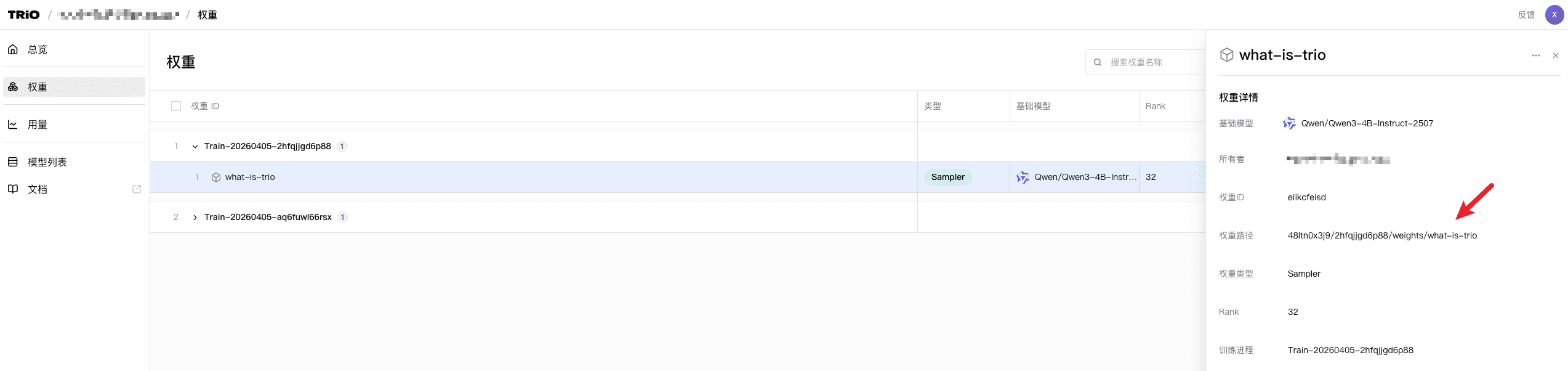
Copy it and paste it into the model_path parameter of create_sampling_client to sample with that weight.
sampling_client = service_client.create_sampling_client(
    base_model="Qwen/Qwen3-4B-Instruct-2507",
    model_path="YOUR_MODEL_PATH",
)
Scenario 2: load newly trained weights in the same process
Use the save_weights_and_get_sampling_client method on training_client. It saves the current weights and loads them into a new sampling_client:
sampling_client = training_client.save_weights_and_get_sampling_client()Compute Logprobs
If you want to quickly compute logprobs for one prompt, use the compute_logprobs method on sampling_client:
prompt = trio.ModelInput.from_ints(tokenizer.encode(data))
logprobs = sampling_client.compute_logprobs(prompt).result()
print("logprobs", logprobs)
OpenAI API Compatibility
PyTRIO is compatible with multiple interfaces of the openai library, so you can quickly connect trained models to your application.
See Advanced / OpenAI API for details.
Multimodal Inference
See the multimodal documentation for details on multimodal inference.
Training
Learn how to write SFT and reinforcement learning training logic locally with PyTRIO and run it on a managed GPU cluster.
Multimodal
Next Page