Guide
Resume Training
Resume training only works with Train checkpoints. PyTRIO loads the saved model weights and optimizer state, then continues training from that point.
If you have not saved a Train checkpoint yet, use save_state first. See Save Weights.
Get the Checkpoint Path
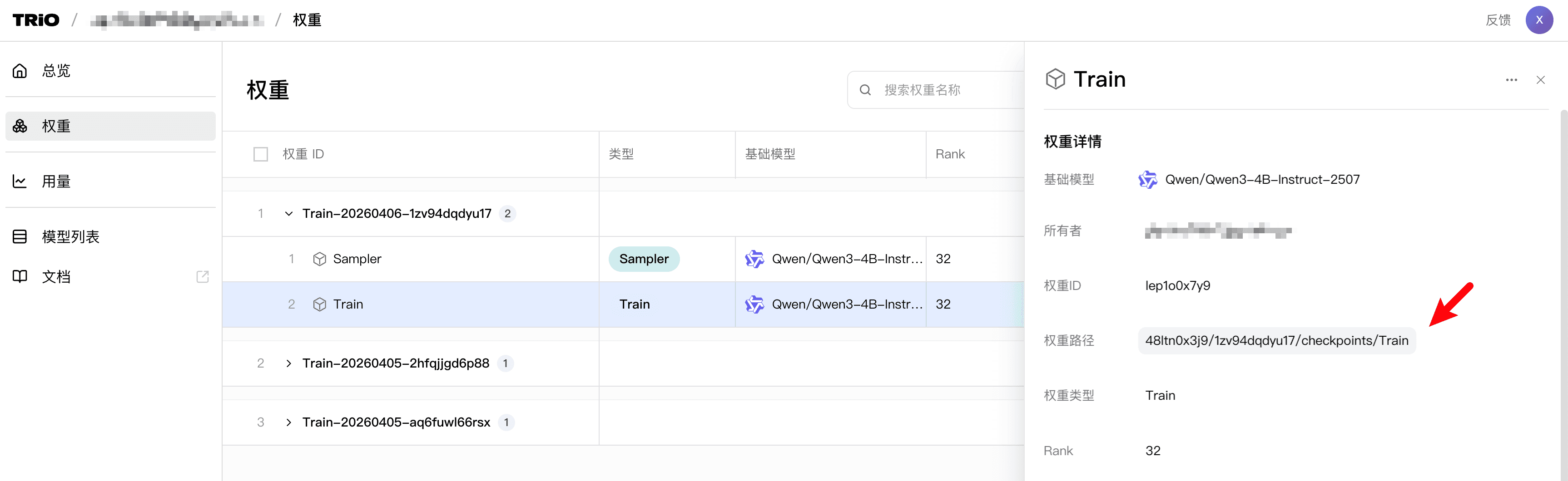
Find the train-checkpoint path in the Web UI:
Restore Model and Optimizer State
Pass that path to create_training_client_from_state_with_optimizer:
import pytrio as trio

service_client = trio.ServiceClient()

training_client = service_client.create_training_client_from_state_with_optimizer(
    path="YOUR_TRAIN_CHECKPOINT_PATH",
)
After this, continue with forward_backward and optim_step; training resumes from the checkpoint state.
Load Weights Only
If you want to load saved weights without optimizer state, use create_training_client_from_state:
import pytrio as trio

service_client = trio.ServiceClient()

training_client = service_client.create_training_client_from_state(
    path="YOUR_ADAPTER_PATH",
)
This creates a new training client initialized from existing weights. Because optimizer state is not restored, it is not strict checkpoint resume training.
Was this documentation helpful?