Download Adapters
Download a LoRA Adapter
Open the Web UI, find the adapter you want to export, and copy its checkpoint ID:
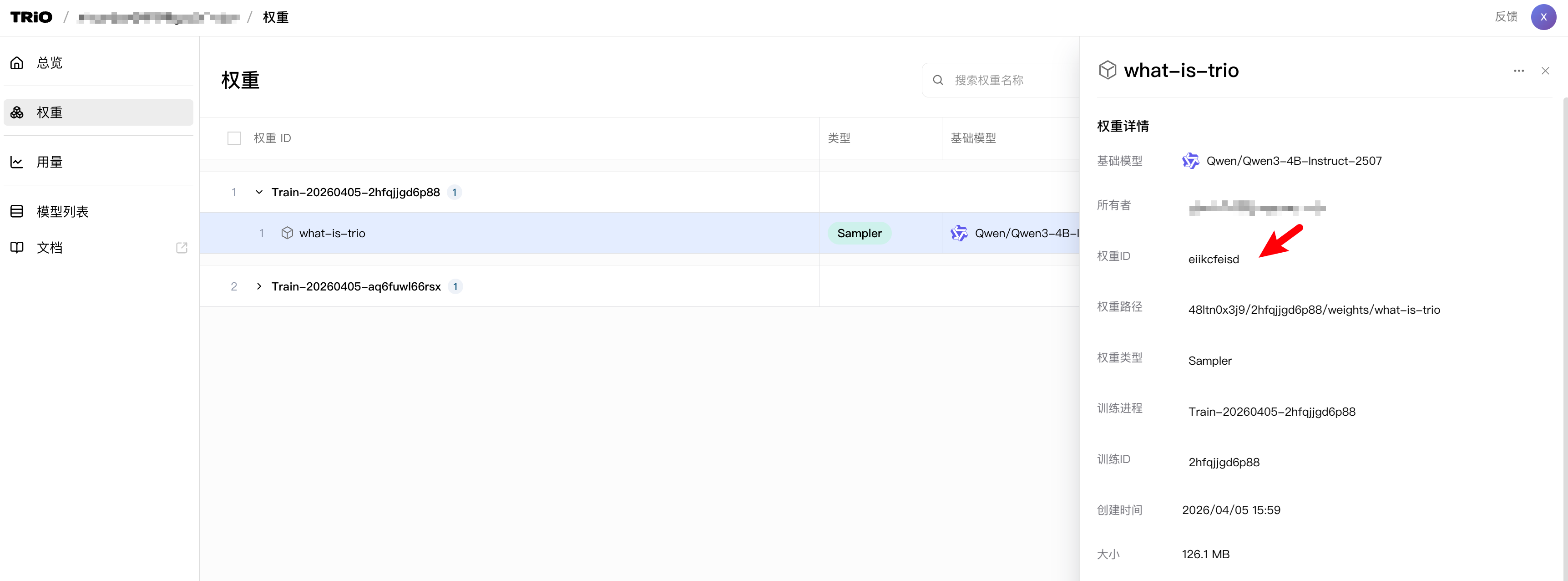
Paste the checkpoint ID into checkpoint_id, then run the script:
import pytrio as trio
import requests
import os

client = trio.ServiceClient()
rest_client = client.create_rest_client()

checkpoint_id = "YOUR CHECKPOINT ID"
res = rest_client.get_checkpoint_archive_url(checkpoint_id).result()
print("Got the model download link::", res)

download_url = res.url
save_filename = f"{checkpoint_id}.zip"

with requests.get(download_url, stream=True) as response:
    response.raise_for_status()
    with open(save_filename, "wb") as f:
        for chunk in response.iter_content(chunk_size=8192):
            f.write(chunk)

print(f"File download complete! Save path: {os.path.abspath(save_filename)}")
The downloaded file is a .zip archive. After extraction, it contains a LoRA adapter in PEFT format, not a full copy of the base model:
checkpoint/
├── adapter_config.json         # LoRA config (rank, alpha, target modules, etc.)
├── adapter_model.safetensors   # LoRA adapter weights, much smaller than a full model
└── generation_config.json      # Generation parameters (temperature, top_p, etc.)
Because the archive only contains the adapter, deployment must also load the matching base model, such as Qwen/Qwen3.5-4B.
Deploy the Model
After downloading the adapter, you can use it locally in two common ways.
This guide uses Qwen/Qwen3.5-4B as the example. First, download the base model.
For mainland China networks, ModelScope is recommended:
pip install modelscope
python -c "from modelscope import snapshot_download; snapshot_download('Qwen/Qwen3.5-4B', local_dir='./base_model')"
Or use Hugging Face (requires access to Hugging Face):
pip install huggingface_hub
huggingface-cli download Qwen/Qwen3.5-4B --local-dir ./base_model
Option 1: Transformers + PEFT
This is the simplest way to validate training results without merging the adapter.
pip install transformers peft accelerate torchimport torch
from transformers import AutoTokenizer, AutoModelForCausalLM
from peft import PeftModel
BASE_MODEL_PATH = "./base_model"
ADAPTER_PATH = "./checkpoint" # Files extracted from the zip archive
tokenizer = AutoTokenizer.from_pretrained(BASE_MODEL_PATH, trust_remote_code=True)
model = AutoModelForCausalLM.from_pretrained(
BASE_MODEL_PATH,
dtype=torch.bfloat16,
device_map="auto",
trust_remote_code=True,
)
model = PeftModel.from_pretrained(model, ADAPTER_PATH)
model.eval()
messages = [{"role": "user", "content": "Hello, please introduce yourself."}]
text = tokenizer.apply_chat_template(messages, tokenize=False, add_generation_prompt=True)
inputs = tokenizer([text], return_tensors="pt").to(model.device)
with torch.no_grad():
output_ids = model.generate(**inputs, max_new_tokens=512, temperature=0.7, top_p=0.8, do_sample=True)
new_ids = output_ids[0][inputs["input_ids"].shape[1]:]
print(tokenizer.decode(new_ids, skip_special_tokens=True))Option 2: Merge the LoRA Adapter Into the Base Model
Merge the adapter into the base model to produce a standalone Hugging Face model.
# merge_lora.py
import torch
from transformers import AutoTokenizer, AutoModelForCausalLM
from peft import PeftModel

BASE_MODEL_PATH = "./base_model"
ADAPTER_PATH    = "./checkpoint"
MERGED_PATH     = "./merged_model"

tokenizer = AutoTokenizer.from_pretrained(BASE_MODEL_PATH, trust_remote_code=True)
model = AutoModelForCausalLM.from_pretrained(
    BASE_MODEL_PATH,
    dtype=torch.bfloat16,
    device_map="cpu",   # Use CPU for merging to save GPU memory
    trust_remote_code=True,
)
model = PeftModel.from_pretrained(model, ADAPTER_PATH)
model = model.merge_and_unload()

model.save_pretrained(MERGED_PATH, safe_serialization=True)
tokenizer.save_pretrained(MERGED_PATH)
print("Merge!")
python merge_lora.pyAfter merging, merged_model/ is a standard Hugging Face model. You can deploy it with vLLM, SGLang, Ollama, or another compatible runtime.