Clock cycles
PyTRIO's async training APIs let local data preparation and remote model computation progress concurrently. Understanding clock cycles helps you time forward_backward_async() and optim_step_async() submissions so shared compute does not sit idle waiting for the local client.
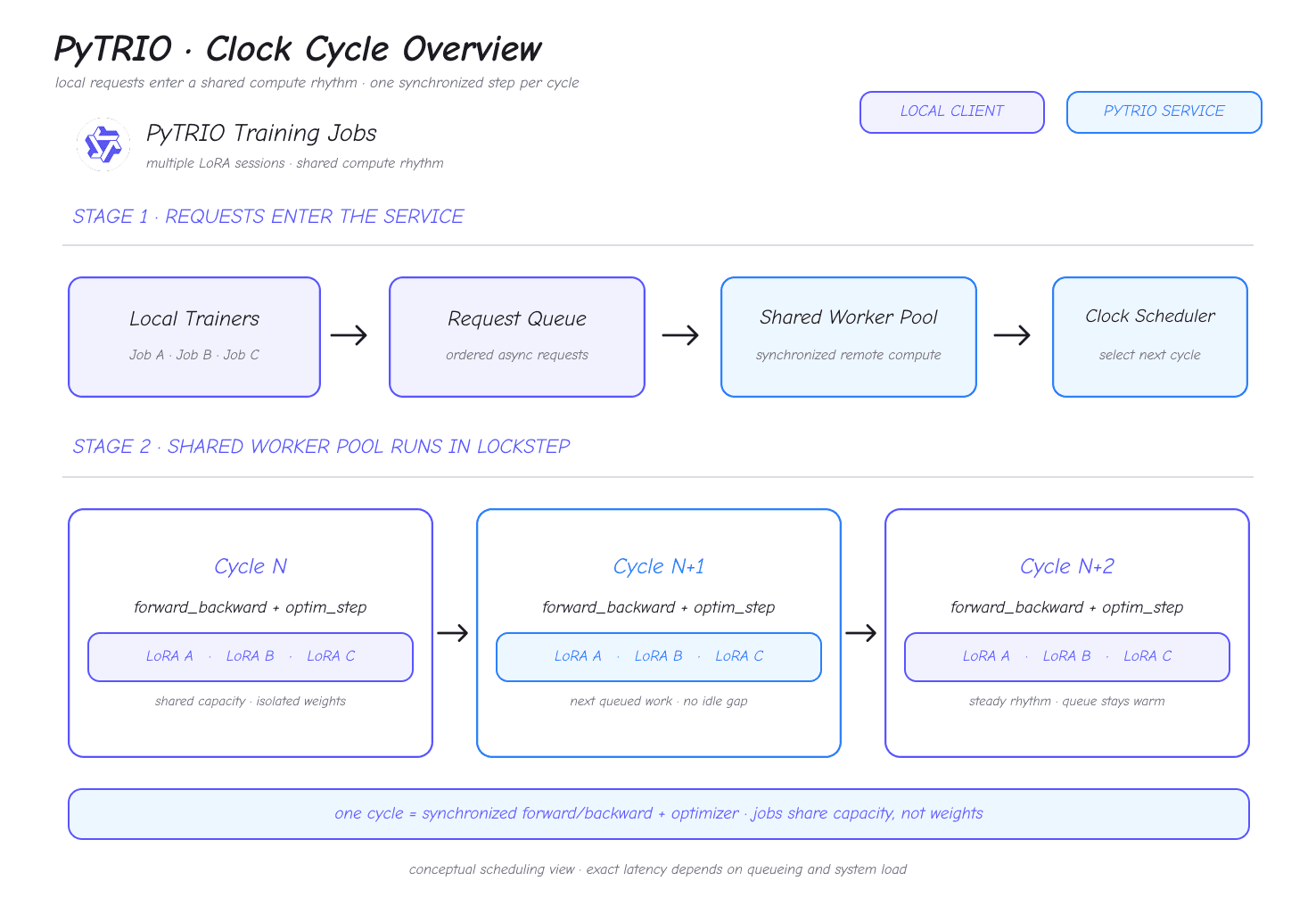
A clock cycle is a scheduling abstraction, not a fixed number of milliseconds. Its wall-clock duration depends on the request queue, batch size, model, and system load.
Understand clock cycles
The PyTRIO service schedules multiple LoRA training jobs on a shared worker pool. The pool advances in synchronized steps, and each step is one clock cycle. A cycle can process forward passes, backward passes, and optimizer updates from multiple jobs.
Jobs share compute capacity while their LoRA weights and optimizer states remain isolated. Small batches can still use the shared capacity, but a request starts at an eligible cycle boundary, so submission timing also affects end-to-end latency.
Put one update in the same cycle
PyTRIO training async APIs have two await boundaries:
await training_client.forward_backward_async(...)submits the request and returns anAPIFuture.await fwdbwd_futurewaits for the remote computation and returns its result.
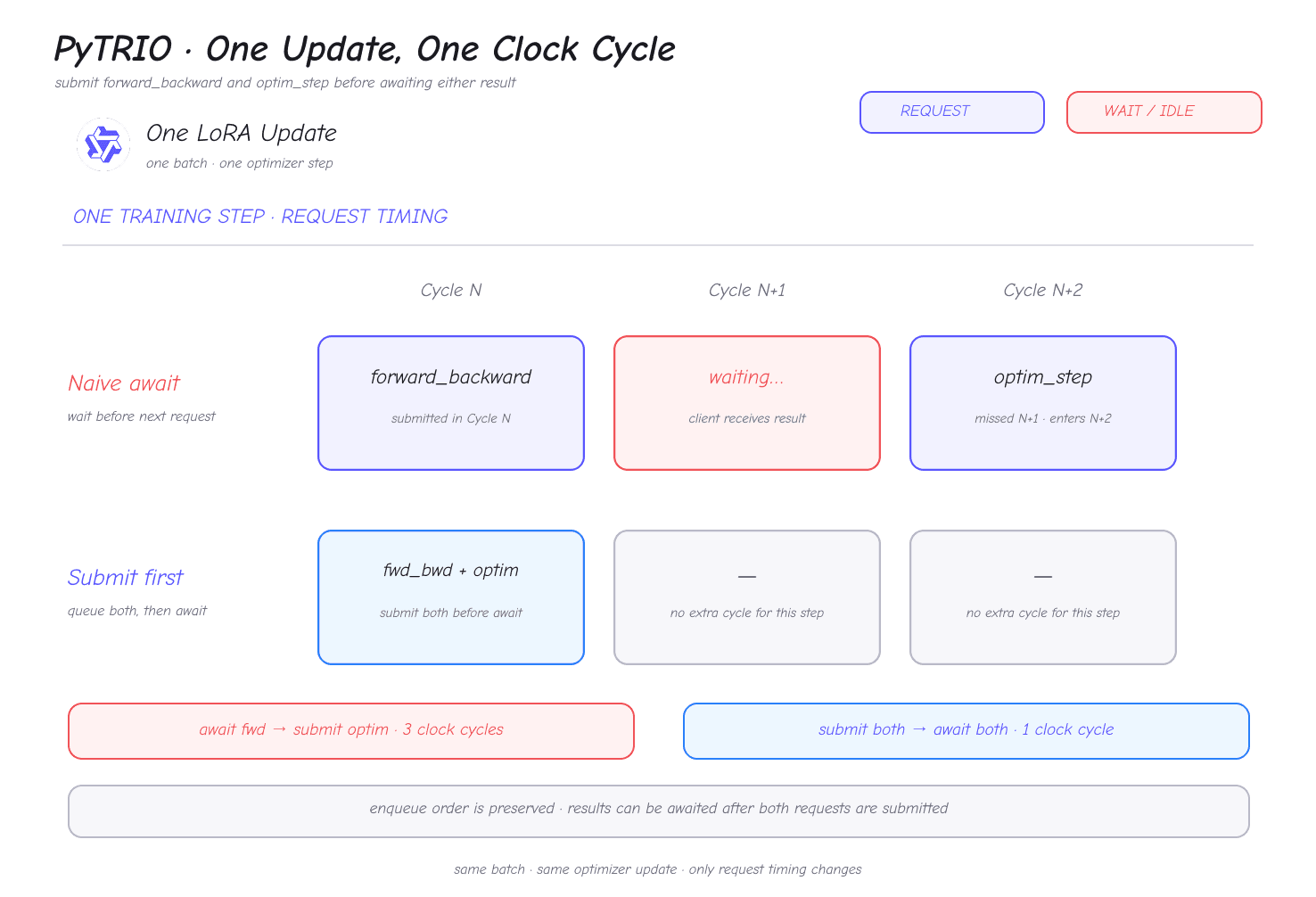
After the first await returns, the local program can submit another training request. Use that interval to submit optim_step_async() so the forward/backward operation and optimizer update can be scheduled as one training update.
The following snippets assume that training_client already exists, batch contains trio.Datum objects, and adam_params is configured.
Submit and wait one at a time
This version waits for forward/backward to finish before submitting the optimizer update:
fwdbwd_future = await training_client.forward_backward_async(
    batch,
    "cross_entropy",
)
fwdbwd_result = await fwdbwd_future

optim_future = await training_client.optim_step_async(adam_params)
await optim_future
In the illustrated schedule, optim_step misses Cycle N+1 and does not start until Cycle N+2, so one update spans three clock cycles.
Submit first, then wait
Submit both requests in training order before waiting for either result:
fwdbwd_future = await training_client.forward_backward_async(
    batch,
    "cross_entropy",
)
optim_future = await training_client.optim_step_async(adam_params)

fwdbwd_result = await fwdbwd_future
await optim_future
Both requests enter the queue before the local client waits, allowing the service to schedule the update in one clock cycle. Keep forward_backward_async() before optim_step_async() in submission order.
Fill later cycles with a pipeline
Waiting for one update before submitting the next batch leaves a gap between batches. Batch pipelining submits Batch N+1 before awaiting Batch N, keeping a runnable request available for later cycles.
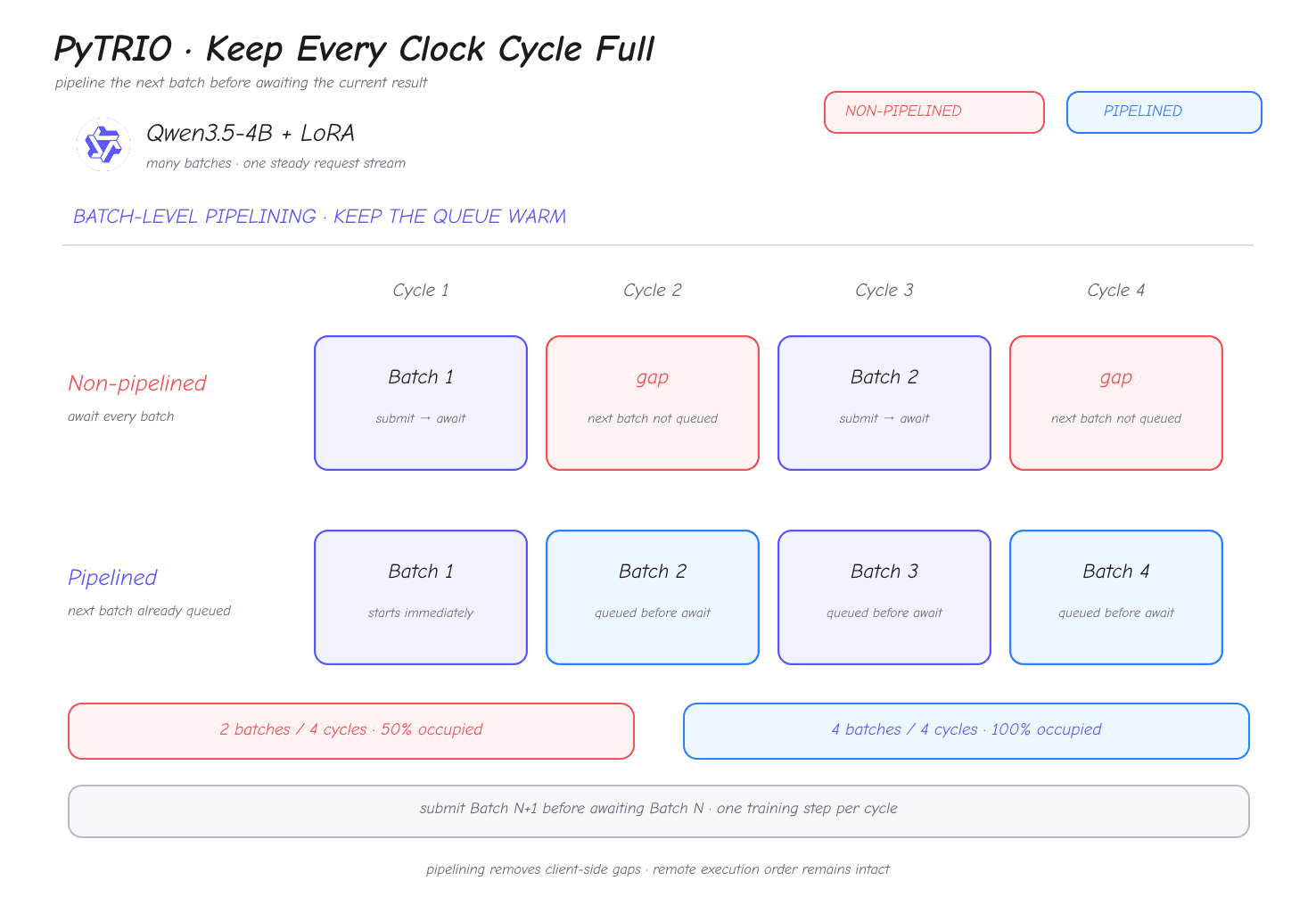
The following example uses one-batch lookahead. At most the current and next update are queued, which fills client-side gaps without submitting an unbounded number of requests.
import pytrio as trio


async def submit_update(training_client, batch, adam_params):
    fwdbwd_future = await training_client.forward_backward_async(
        batch,
        "cross_entropy",
    )
    optim_future = await training_client.optim_step_async(adam_params)
    return fwdbwd_future, optim_future


async def train_pipelined(
    training_client,
    batches: list[list[trio.Datum]],
    learning_rate: float,
):
    if not batches:
        return []

    adam_params = trio.AdamParams(learning_rate=learning_rate)
    current = await submit_update(training_client, batches[0], adam_params)
    results = []

    for next_batch in batches[1:]:
        # Queue the next batch before waiting for the current batch.
        following = await submit_update(training_client, next_batch, adam_params)

        fwdbwd_future, optim_future = current
        results.append(await fwdbwd_future)
        await optim_future
        current = following

    fwdbwd_future, optim_future = current
    results.append(await fwdbwd_future)
    await optim_future
    return results
Use this pattern when the next batch is already prepared and does not depend on the current result. If the next batch must be generated from the current result, preserve that dependency and optimize only the request order within each update.
Choose a submission pattern
| Scenario | Recommended pattern | Why |
|---|---|---|
| Single-step debugging or a short job | Submit both requests for the update, then await them | Keeps the logic simple and removes the within-update gap |
| Independent SFT batches | Use one-batch lookahead | The next batch can enter the queue early |
| The next batch depends on the current result | Overlap only the two requests in the current update | Preserves the algorithm's data dependency |
| A job has many batches | Use a bounded pipeline | Controls the number of in-flight futures and local memory use |
Measure throughput over multiple end-to-end training steps. The wall-clock duration of an individual cycle varies with queue and system load; the cycle counts in the diagrams explain request scheduling relationships.
For APIFuture behavior and other async methods, continue with the async guide.