Advanced
OpenAI API
PyTRIO exposes an OpenAI-compatible endpoint for chat completions, text completions, and model listing. This makes it straightforward to connect trained adapters or base models to existing applications that use the OpenAI Python library.
Configuration
- Set the OpenAI-compatible base URL to:
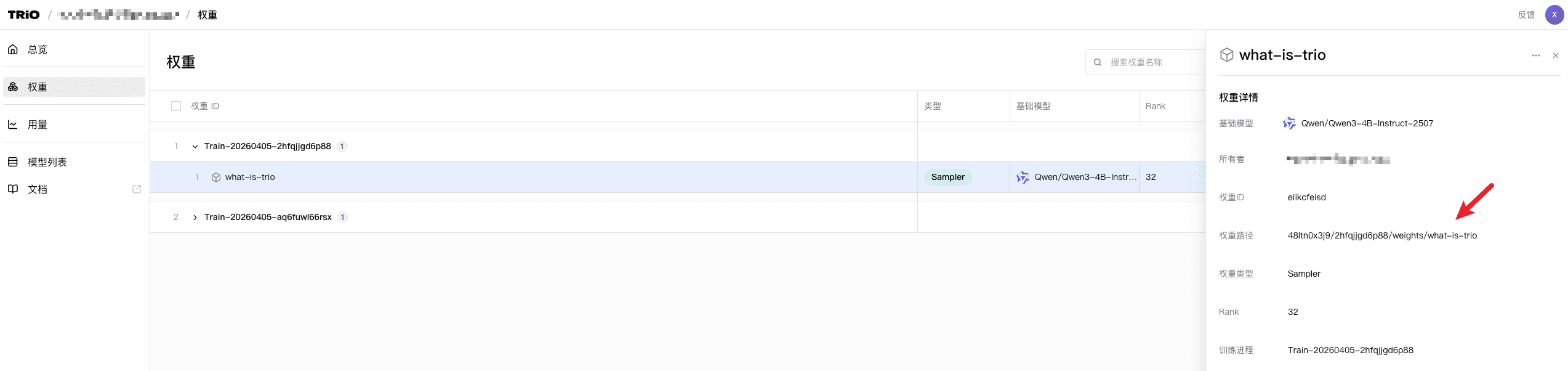
https://pytrio.com/api/openai/v1- To use a trained adapter, open the Weights tab in the Web UI and copy the path from the details drawer.
-
To use a base model, copy its model name from the Models page.
-
Copy your PyTRIO API key from the Dashboard.
Examples
Chat
from openai import OpenAI

BASE_URL = "https://pytrio.com/api/openai/v1"
MODEL_PATH = "YOUR_MODEL_PATH"  # adapter path or base model name
API_KEY = "YOUR_TRIO_API_KEY"

client = OpenAI(
    base_url=BASE_URL,
    api_key=API_KEY,
)

response = client.chat.completions.create(
    model=MODEL_PATH,
    messages=[{"role": "user", "content": "what's your name?"}],
    max_tokens=50,
    temperature=0.7,
    top_p=0.9,
)

print(f"{response.choices[0].message.content}")
Streaming chat
from openai import OpenAI

BASE_URL = "https://pytrio.com/api/openai/v1"
MODEL_PATH = "YOUR_MODEL_PATH"  # adapter path or base model name
API_KEY = "YOUR_TRIO_API_KEY"

client = OpenAI(
    base_url=BASE_URL,
    api_key=API_KEY,
)

stream = client.chat.completions.create(
    model=MODEL_PATH,
    messages=[{"role": "user", "content": "Hello! Please briefly introduce yourself."}],
    max_tokens=1024,
    temperature=0.7,
    top_p=0.9,
    stream=True,
)

for chunk in stream:
    if not chunk.choices:
        continue
    content = chunk.choices[0].delta.content
    if content:
        print(content, end="", flush=True)
Image chat
PyTRIO currently accepts images only as Base64 data URLs. Local paths and regular image URLs are not supported. The example below uses a JPEG image; for a PNG image, change the MIME type to image/png.
import base64
from pathlib import Path

from openai import OpenAI

BASE_URL = "https://pytrio.com/api/openai/v1"
MODEL_PATH = "YOUR_MODEL_PATH"  # adapter path or base model name
IMAGE_PATH = Path("YOUR_IMAGE_PATH")
IMAGE_MIME_TYPE = "image/jpeg"
API_KEY = "YOUR_TRIO_API_KEY"

image_base64 = base64.b64encode(IMAGE_PATH.read_bytes()).decode("ascii")
image_data_url = f"data:{IMAGE_MIME_TYPE};base64,{image_base64}"

client = OpenAI(
    base_url=BASE_URL,
    api_key=API_KEY,
)

stream = client.chat.completions.create(
    model=MODEL_PATH,
    messages=[
        {
            "role": "user",
            "content": [
                {"type": "text", "text": "Describe this image."},
                {"type": "image_url", "image_url": {"url": image_data_url}},
            ],
        }
    ],
    max_tokens=1024,
    temperature=0.7,
    top_p=0.9,
    stream=True,
)

for chunk in stream:
    if not chunk.choices:
        continue
    content = chunk.choices[0].delta.content
    if content:
        print(content, end="", flush=True)
Completion
from openai import OpenAI

BASE_URL = "https://pytrio.com/api/openai/v1"
MODEL_PATH = "YOUR_MODEL_PATH"
API_KEY = "YOUR_TRIO_API_KEY"

client = OpenAI(
    base_url=BASE_URL,
    api_key=API_KEY,
)

response = client.completions.create(
    model=MODEL_PATH,
    prompt="what's your name?",
    max_tokens=50,
    temperature=0.7,
    top_p=0.9,
)

print(f"{response.choices[0].text}")Was this documentation helpful?