What is PyTRIO
PyTRIO is a fully managed LLM post-training engine for LoRA, SFT, reinforcement learning, checkpoint recovery, and adapter downloads.
PyTRIO lets you focus on the parts that matter in LLM post-training: your data and your algorithm. We handle the distributed training complexity for you.
Write a simple script on a CPU-only machine. Define your data, environment, and loss function. PyTRIO scales the job to a GPU cluster and runs the computation you specify. To switch models, you usually only need to change one string.
PyTRIO keeps the training loop in your hands. It is not a black-box fine-tuning product. It is an abstraction layer that preserves algorithmic control while taking care of the distributed systems work.
Bad infrastructure and endless glue work slow down research. PyTRIO is built so researchers can spend more time on algorithms and less time on training infrastructure.
Features
PyTRIO currently supports:
- LoRA fine-tuning for open-weight models, including dense and mixture-of-experts architectures.
- Supervised fine-tuning and reinforcement learning workflows, with common loss functions built in.
- Asynchronous APIs for high-throughput, multi-step training pipelines.
- Multimodal inference and training.
- Separate APIs for saving sampler weights and train checkpoints, with resume support from Train checkpoints.
- Downloadable LoRA adapters that can be used outside PyTRIO with your own inference stack.
Overview
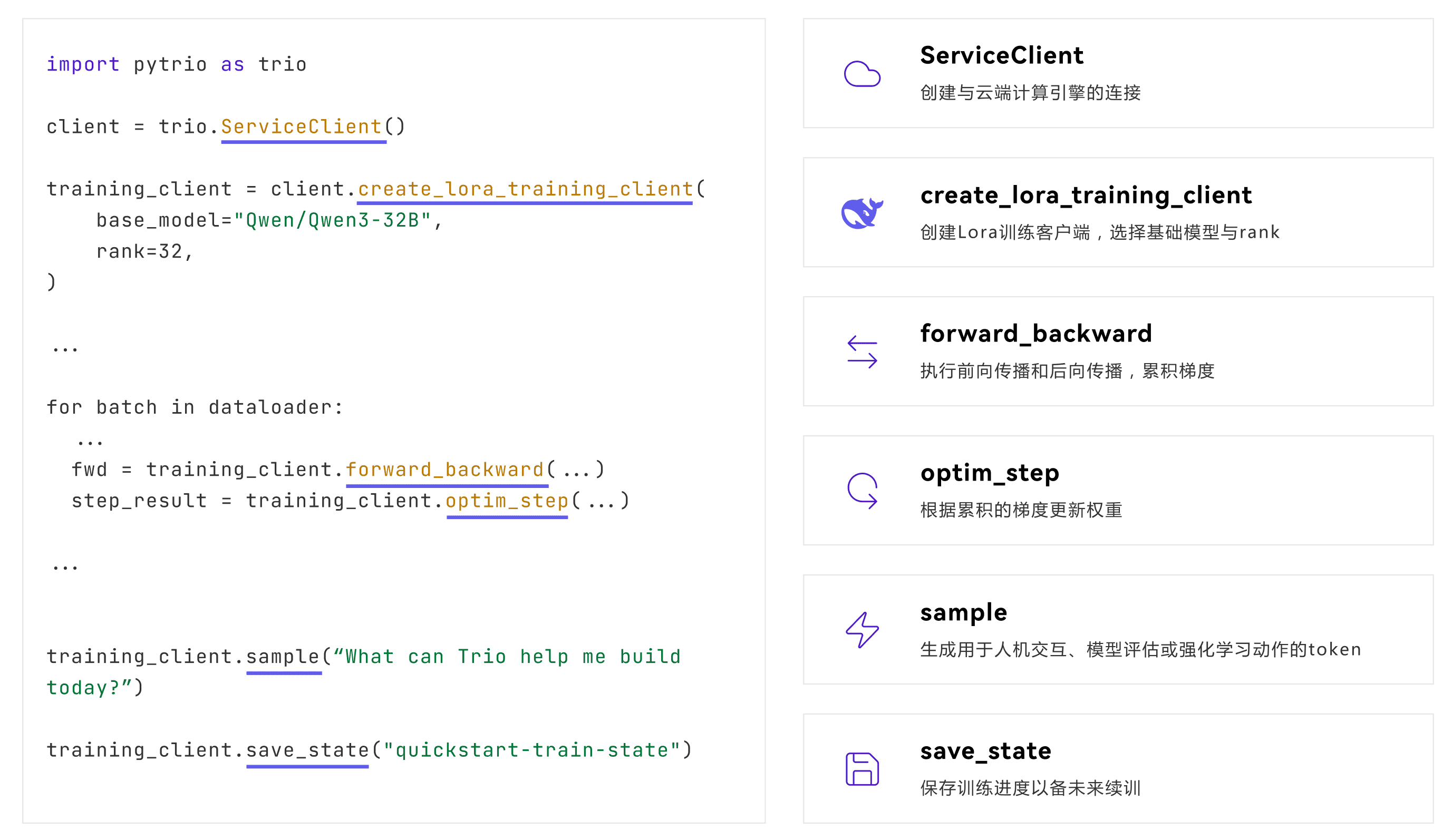
PyTRIO is centered around a small set of core functions:
forward_backward: run the model, evaluate the loss function, and accumulate gradients.optim_step: update weights from the accumulated gradients.sample: generate outputs from a base model or a trained adapter.- Save and load APIs: persist LoRA adapters, checkpoints, and optimizer state.
Start Here
- Quick Start: install PyTRIO, log in, run your first inference request, and start your first training job.
- Training: learn the core SFT and RL training loop.
- Inference: sample from base models and trained adapters.
- Save Weights: save sampler weights, train checkpoints, or temporary sampling weights.
- Resume Training: restore training from a Train checkpoint.
- Download Adapters: export LoRA adapters and deploy them yourself.
- Loss Functions: understand built-in and custom loss functions.
- Async: use async APIs for higher-throughput pipelines.
- Multimodal: learn how to use multimodal inference and training.
Community
- Feedback: link
- Partnership and contact: contact@swanlab.cn
Coding Agent Skill
Want a coding agent to write PyTRIO training code with the right API patterns? Try PyTRIO.skill.
In Claude Code, send:
Fetch the installation guide and follow it: https://raw.githubusercontent.com/SwanHubX/pytrio-skill/master/installation.mdOr install it manually:
mkdir -p .claude/skills/pytrio-skill
curl -sL https://github.com/SwanHubX/pytrio-skill/releases/latest/download/pytrio-skill.tar.gz | tar xz -C .claude/skills/pytrio-skill/
It includes:
SKILL.md: common pitfalls, PyTorch concept mapping, and an API reference.references/: API references and debugging guides.examples/: runnable examples.best-practices/: SFT and GRPO best practices.